Reiciendis voluptatibus...

At vero eos et accusamus et iusto odio dignissimos ducimus qui blanditiis praesentium voluptatum deleniti atque corrupti...

Reiciendis voluptatibus maiores

Asumenda omnis dolor...

At vero eos et accusamus et iusto odio dignissimos ducimus qui blanditiis praesentium voluptatum deleniti atque corrupti...

Asumenda omnis dolor

Voluptates repudiandae ...

At vero eos et accusamus et iusto odio dignissimos ducimus qui blanditiis praesentium voluptatum deleniti atque corrupti...

Voluptates repudiandae sint

Necessitatibus saepe ev...

At vero eos et accusamus et iusto odio dignissimos ducimus qui blanditiis praesentium voluptatum deleniti atque corrupti...

Necessitatibus saepe eveniet

Omnis dolor repellendus...

At vero eos et accusamus et iusto odio dignissimos ducimus qui blanditiis praesentium voluptatum deleniti atque corrupti...

Omnis dolor repellendus

Pomnis voluptas assumen...

At vero eos et accusamus et iusto odio dignissimos ducimus qui blanditiis praesentium voluptatum deleniti atque corrupti...

Pomnis voluptas assumenda

Harum quidem rerum...

At vero eos et accusamus et iusto odio dignissimos ducimus qui blanditiis praesentium voluptatum deleniti atque corrupti...

Harum quidem rerum
  • Reiciendis voluptatibus maiores
  • Asumenda omnis dolor
  • Voluptates repudiandae sint
  • Necessitatibus saepe eveniet
  • Omnis dolor repellendus
  • Pomnis voluptas assumenda
  • Harum quidem rerum
Showing posts with label PHONES. Show all posts

Wednesday, 14 December 2011

Make your own favorite iphone in 7 ways

Everyone represents themselves in their own way. Then why the iphone that we are using should be in the same single form??? Here are the seven ways to change your iphone according to your taste.

FOR: THE DJ

Bone Collection Horn Stand
Price: $9.99
Pump up the volume! This little portable amplifier may not look like much, but it's got some decent power. No batteries needed. 


FOR: THE PHOTOGRAPHER

iPhone Telephoto Lens and Tripod
Price: $31.99
Sometimes you actually do want to be in the picture. This setup will appeal to your inner photographer. The kit comes with a hard case for your phone, an 8X telephoto lens, mini tripod, and an attachment to fit the phone to the tripod. 


FOR: THE COUCH POTATO

I-Got-Control Apple iPad/iPhone/iPod Universal Remote Controller
Price: $39.99
How many times have you or someone you loved shouted that in disgust: "Too many remotes!"? Why not use the thing that's by your side at all times? The IRB1 accessory and the associated i-Got-Control app let you control your infrared-based devices—home theater components, lights, fans, etc. Thousands of remotes are pre-installed and if the device doesn't have the code initially, it can "learn" it. The device is small enough that you can even take it on the road with you. 


FOR: THE THROWBACK

'80s Retro iPhone Case
Price: $20
Can't get enough of the '80s? If you love retro then check out this iPhone case. Measuring 2.75 by 2.5 by 7.5 inches, this plastic case is big, bulky, and so not high tech. All you need now is your parachute pants and Members Only jacket. 


FOR: THE SCIENCE GEEK

Mini Microscope for iPhone
Price: $39.97
Are you a closet Marie Curie? Perhaps you're just naturally curious. This Mini Microscope should satisfy your inner science geek…at least a bit. The lightweight microscope provides 60X magnification and LEDs for viewing different objects. 


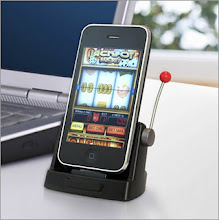
FOR: THE GAMBLER

Jackpot Slots
Price: $34.95
• Fits Apple iPhone 2G, 3G, 3GS, or 4 and all iPod touch models
• Requires iOS 3.0 (or higher)
Looking for a cheap alternative to Vegas? Get your own one-armed bandit courtesy of Jackpot Slots. The hardware accessory works in combination with the free Jackpot Slots app to bring you a realistic slot machine experience, including the spinning action. Just don't expect quarters to shoot out of your iPhone. 


FOR: THE OLD-SCHOOL GAMER

Pinball Magic
Price: $34.99
• Fits Apple iPhone 2G, 3G, 3GS, or 4 and all iPod touch models
• Requires iOS 3.0 (or higher)
Are you a pinball wizard? If so, check out this portable (and we mean super small) pinball accessory table. Simply install the free Pinball Magic Game app, slip the phone into the casing, and it's time to learn the angles. All the class game controls are here: ball-launching plunger, flipper buttons, and a backbox that lights up.

Posted by Love Ur Life 0 comments

Thursday, 17 November 2011

The Best Android Phones


It's hard to believe that it's been just three years since Google's open-source Android mobile operating system hit the scene. When the first Android phone, the T-Mobile G1, was released, the mobile landscape looked very different. Most people carried simple handsets that focused on making calls. If you were lucky, you could listen to music or play games on your mobile phone. Back then, you didn't have to have a smartphone that ran thousands of apps to let you, in the palm of your hand, do many of the things your computer could do. Apps weren't even a thing yet. Apple had only released the iPhone 3G and launched its groundbreaking App Store a couple of months earlier. 

It was the introduction of Android that helped propel the app-based smartphone to what it is today. The thing Android offered, which Apple's iPhone couldn't, was choice. Since it was an open-source platform, several hardware manufacturers could use the OS on their handsets, and a variety of wireless carriers could offer those phones—and they did.

A year after Android was released, in the U.S. there was a single Apple iPhone on a single carrier, but there were eight different Android handsets with varying form factors available on three of the four major carriers. Today, you can find a variety of Android phones on AT&T, Sprint, T-Mobile, and Verizon Wireless. According to Comscore, Android enjoys 45 percent of the U.S. smartphone market.

That's a lot of phones to choose from. To come up with our list, we've chosen two winners for each of the four major carriers, and if you're contract-phobic, the best unlocked handset. If you've settled on Android as your mobile platform, these phones are your best bets—for now, that is. At this rate of growth, we can assure you that there's another great 'Droid right around the corner.


Samsung Galaxy S II Skyrocket SGH-I727 (AT&T)


The Samsung Galaxy S II Skyrocket SGH-I727 offers blistering AT&T LTE data speeds, a massive screen, and very fast dual-core performance.


Motorola Atrix 2 (AT&T)


The Motorola Atrix 2 for AT&T is still based on an idea that's ahead of its time. But if you're the geeky type, you can have plenty of fun with this 4G phone that, with the right accessories, transforms into other devices.


Motorola Photon 4G (Sprint)


The Motorola Photon 4G is Sprint's super-duper, top-of-the-line phone. It can even double as a nettop PC in a pinch. The Photon is one of the most powerful Android handsets you can buy today, and a shining example of what a smartphone in 2011 should be.


Samsung Galaxy S II Epic 4G Touch (Sprint)


The Samsung Galaxy S II Epic 4G Touch packs a rich, gorgeous screen and a speedy dual-core processor making it a top Android choice for Sprint.


Samsung Galaxy S II (T-Mobile)


The Samsung Galaxy S II combines a blistering dual-core processor, a terrific screen, and fast HSPA+ 42 speeds to make it the top Android smartphone available on T-Mobile right now.


HTC Amaze 4G (T-Mobile)


The HTC Amaze 4G has a big beautiful screen, a great camera, and fast HSPA+ 42 speeds, making it an excellent choice for Android smartphones on T-Mobile. 


Motorola Droid Bionic (Verizon Wireless)


If you're looking for lightning-fast Web access, top-notch apps, and unique features, the Android-based Motorola Droid Bionic is your phone. It can even transform into a laptop or a desktop PC. 


Motorola Droid RAZR (Verizon Wireless)


The Motorola Droid RAZR is Verizon's classiest, most powerful smartphone for now, but it may be quickly outpaced by competitors.


HTC Rezound (Verizon Wireless)


The HTC Rezound distinguishes itself from a sea of Android smartphones with enhanced Beats Audio and high-quality earphones, along with fast data speeds on Verizon's 4G LTE network.


Samsung Galaxy S II (Unlocked)


The finest Android smartphone available today, the unlocked Samsung Galaxy S II delivers in almost every way. Thing is, it's so expensive, it almost prices itself out of the market.

Posted by Love Ur Life 0 comments

Friday, 28 October 2011

Nokia's first Windows-based phones - The Lumia 800 and Lumia 710

Nokia, One of the leading manufacturers of mobile phones has now decided to launch their first Windows based smartphone. This decision was announced by Nokia during Nokia World 2011 in London. 


First Windows Phone 7-based smartphones in the form of the Lumia 800 and Lumia 710, both featuring 3.7-inch touchscreen displays and 1.4GHz single-core Qualcomm CPUs.


Nokia World is the company's annual event, where new devices, software solutions and the company's objectives are unveiled. Held October 26-27 in London, this year's event is particularly significant, due to the release of the first Nokia Windows-based smartphones, expected since Nokia inked a deal with Microsoft in a somewhat surprising move this February.


Nokia Lumia 800

The Lumia 800 is similar to the MeeGo-based Nokia N9 in terms of design. The 800's polycarbonate unibody comes with the same dimensions and curved glass screen coating as the N9, while the main differences are hardware buttons on the Lumia's front (Back, Start and Search) and a physical camera button. 


The Lumia 800 features a 3.7-inch AMOLED ClearBlack display running at 800 x 480 resolution. Its 8-megapixel camera is equipped with Carl Zeiss optics, dual LED flash, as well as HD 720p 30fps video recording capability.


Processing is provided by a 1.4GHz single-core Qualcomm Snapdragon MSM8255 with the same Scorpion CPU as the one utilized in the Windows Phone-based HTC Titan and Samsung OMNIA W. There's also 512 MB of RAM and 16GB of built-in memory, with an additional 25GB accessible online via SkyDrive. The Lumia 800 has a 1450mAh battery, with 13 hours of rated talktime in 2G, 9.5 hours in 3G and 335 hours of standby time.


Running Windows Phone 7.5 (Mango) with browsing provided by Internet Explorer 9, the Lumia 800 comes with Nokia-specific software including Nokia Drive turn-by-turn free offline navigation with in-car user interface, MixRadio music-streaming app offering channels with "locally-relevant music," as well as Gigfinder, allowing users to search for live local music, share discoveries on social networks and buy concert tickets.

Offered in cyan, magenta and black, the Nokia Lumia 800 is priced at EUR420 (US$584) before taxes. It's scheduled to be rolled out in France, Germany, Italy, the Netherlands, Spain and the UK this November, as well as in Hong Kong, India, Russia, Singapore and Taiwan by the end of the year. Other markets will obtain the 800 in early 2012.

Nokia Lumia 710

The second Windows-based Nokia arrival, the Lumia 710, comes with a 3.7-inch 800 x 480 ClearBlack TFT display. It will be offered in black or white with choice of black, white, cyan, fuchsia and yellow interchangeable back covers to suite the user's preferences. Smartphone photography enthusiasts can use its 5-megapixel snapper with autofocus, LED flash and 30fps HD 720p video recording.


As with the Lumia 800, the 710 runs Windows Phone 7.5 (Mango) and comes equipped with Nokia Drive turn-by-turn free offline navigation. The unit is powered via the same 1.4GHz Qualcomm CPU, while it offers less built-in storage at 8GB. 


When it comes to connectivity, 3G up to HSDPA 14.4Mbps, WiFi and Bluetooth 2.1 are available. Equipped with a 1300mAh battery, the smartphone weighs in at 126 grams (4.4 oz) and it measures 119 x 62.4 x 12.5 mm (4.7 x 2.4 x 0.5 in).


Priced at EUR270 (US$375) before taxes, the Nokia Lumia 710 will appear first in Hong Kong, India, Russia, Singapore and Taiwan by the end of the year.


Posted by Love Ur Life 0 comments

Monday, 24 October 2011

The iPhone 4S Is the First Bluetooth 4.0 Phone


Among the many novel technological features of the iPhone 4S like Siri and the A5 processor, one that's gotten little attention is that it's the first cell phone to feature Bluetooth 4.0, which makes the iPhone compatible with a whole new category of low-energy wireless devices. That means the phone will be able to talk to things like special thermometers and scales, which previously couldn't have Bluetooth technology since it consumed too much power.

Bluetooth 4.0, which was announced in April last year, expands wireless abilities to many different kinds of products. Now not only can your phone and laptop have wireless abilities, so can your wristwatch, medical bracelet, or anything you can think of that includes a battery. Since the low-power Bluetooth 4.0 radio sips power, devices that previously had to send their data only when connected manually can now do so over the air. All they need is a Bluetooth 4.0-compatible device, like the iPhone 4S and the newly announced Motorola Droid RAZR, on the other side.

Although Bluetooth 4.0 expands the definition of Bluetooth, it risks making things more confusing, since the spec actually includes two different kinds of devices. First, there are the low-energy devices that now have low-power Bluetooth radios. But they need to be designated separately from the traditional products—phones, tablets, and PCs, mainly—that those low-energy gadgets will talk to.

In the hopes of clarity, the Bluetooth Special Interest Group (SIG) today introduced what it calls "Smart Marks," two different labels for the two different classes of Bluetooth devices. Those low-power doodads will now be called Bluetooth Smart devices, while Bluetooth 4.0 devices like your cell phone fall into the category Bluetooth Smart Ready.
The main physical distinction is the radio. Bluetooth Smart devices will have just a single-mode low-power radio while the Smart Ready ones must have a dual-mode radio that does both low and normal power. In addition, a Smart Ready device must be capable of downloading new software to keep its Bluetooth profiles up to date. If it helps, think of the Smart Ready device as a mothership, while the Smart devices are shuttlecraft.

In addition to the iPhone 4S and Motorola RAZR, both the MacBook Air and the Mac Mini include Bluetooth 4.0. It's also on board the Acer Aspire Ultrabook and a few phones recently launched in Japan, the Bluetooth SIG said.
Posted by Love Ur Life 1 comments

Wednesday, 19 October 2011

Secret Codes For iPhones

Following are the secret codes for your i phone

1) *3001#12345#* and tap Call. Enter Field Mode.Field mode reveals many of the inner settings of your iPhone, specifically up-to-date network and cell information.

2) *#06# Displays your IMEI. No need to tap Call.IMEI is the unique identifier for your cell phone hardware. Together with your SIM information it identifies you to the provider network.

3) *777# and tap Call. Account balance for prepaid iPhone.

4) *225# and tap Call. Bill Balance. (Postpaid only)

5) *646# and tap Call. Check minutes. (Postpaid only)These three are pretty self explanatory.

6) *#21# and tap Call. Setting interrogation for call forwards.Discover the settings for your call forwarding. You’ll see whether you have voice, data, fax, sms, sync, async, packet access, and pad access call forwarding enabled or disabled.

7) *#30# and tap Call. Calling line presentation check.This displays whether you have enabled or disabled the presentation of the calling line, presumably the number of the party placing the call.

8) *#76# and tap Call. Check whether the connected line presentation is enabled or not.State whether the connected line presentation is enabled or disabled. Presumably similar to the calling line presentation.

9) *#43# and tap Call. Determine if call waiting is enabled.Displays call waiting status for voice, data, fax, sms,sync data, async data, packet access and pad access. Each item is either enabled or disabled.

10) *#61# and tap Call. Check the number for unanswered calls.Show the number for voice call forwarding when a call is unanswered. Also show the options for data, fax, sms, sync, async, packet access and pad access.

11) *#62# and tap Call. Check the number for call forwarding if no service is available.Just like the previous, except for no-service rather than no-answer situations.

12) *#67# and tap Call. Check the number for call forwarding when the iPhone is busy.And again, but for when the iPhone is busy.

13) *#33# and tap Call. Check for call control bars.Check all the usual suspects (voice, data, fax, sms, etc) to see whether barring is enabled or disabled for outgoing.
Posted by Love Ur Life 0 comments

iPhone 4S vs. Droid Bionic vs. Galaxy S II vs. Photon 4G: Specs Compared


Apple released its latest iPhone, the iPhone 4S, just last week. If you aren't one of the four million to have already picked one up, you may be wondering how it stacks up to the rest of the smartphone competition.

We've already benchmarked the 4S and found that it's the fastest iPhone so far, and the fastest smartphone in general for Web browsing when using the default browser. That may change when Google introduces the latest version of Android, "Ice Cream Sandwich," later this week. The browser in "Gingerbread," the current version of Android for smartphones, doesn't make good use of dual-core capability, which is something Apple has done with iOS 5. Ice Cream Sandwich may change that, but the iPhone 4S is currently the leader when it comes to Web performance.

But how does the 4S compare on a hardware level? We've compiled specs for the iPhone 4S, along with other leading smartphones on AT&T, Sprint, and Verizon, in the table below.


The iPhone 4S is powered by Apple's new dual-core A5 chip, which Apple claims can deliver up to two times more power and seven times faster graphics performance than the iPhone 4. In addition, the iPhone 4S is a world phone, meaning it supports both CDMA and GSM networks.

Improvements have been made to the phone's camera, which can now take 8-megapixel photos and record video at 1080p. And the 4S supports HSPA 14.4 on AT&T, which can deliver theoretical speeds up to 14.4 Mbps.
 
These are definite improvements over the previous iPhone 4, but compared to most current high-end Android devices, they actually aren't all that different. The Motorola Droid Bionic, Motorola Photon 4G, and the Samsung Galaxy S II are all powered by dual-core processors, just like the iPhone 4S. And they all have 8-megapixel rear cameras that can capture 1080p video.

And while the 4S supports HSPA 14.4 on AT&T, the other three phones feature support for even faster data networks, most notably the Droid Bionic, which runs on Verizon's blazing fast 4G LTE network.

Still, real-world testing and usage should also be taken into consideration. While other phones feature an 8-megapixel camera, for instance, in his review of the iPhone 4S, PCMag lead analyst Sascha Segan noted the device is "sharper than any cameraphone in the U.S., with 2000 lines of resolution on our chart." Of the Droid Bionic, on the other hand, Segan said, "I was disappointed by the Droid Bionic's 8-megapixel still camera, which has a very slow autofocus—up to 2 seconds."

So while you can look at the specs here and begin to make comparisons, they only tell half of the story. It's best to read the reviews of each phone, see which one has what you're looking for, and then go from there.
Posted by Love Ur Life 0 comments

Tuesday, 18 October 2011

IPhone 4S Users Report Yellow Screen Issue


Despite posting the best numbers for an iPhone launch ever (4 million in the first week), the iPhone 4S isn't out of the woods yet, as some users are reporting screen quality issues.
The reports began trickling in over the weekend on Apple's discussion forums with some users claiming that their screen was either "washed out" in terms of contrast clarity, or displaying a yellowish tint. Interestingly, this isn't the first time such claims have been made with regards to new iPhones. Last year when the iPhone 4 launched many users claimed that their retina displays were showing whites as yellow, prompting many to return to their local Apple store for a replacement.

But what makes the latest claims odder still is that many of the reports indicate that the yellow tint is present mostly the black iPhone 4S, as opposed to the white model. Of course many consumers have reported no problems at all with their iPhone 4S displays, but the reports from the affected customers are piling up, so much so that some have even resorted to calling this "yellowgate."

For those familiar with Apple history, that nickname may call to mind the "antennagate" moniker attached to the launch of the iPhone 4. Initially, Apple resisted the claims about the new, innovatively crafted antenna. But after numerous reports were filed by both consumers and media alike, Steve Jobs finally relented and held a special press conference to address the issue as well as offer special cases to remedy the matter. In this case, a widespread fix might not be so easy.

So far Apple hasn't made an official statement regarding the screen reports, but those affected haven't reported any problems when attempting to return their phones for a replacement unit. You can review the comments related to the screen issue on Apple's user forums here.
Posted by Love Ur Life 0 comments

How to Use Siri


Siri, the speech-recognition "personal assistant" that's built into all Apple iPhone 4S smartphones, takes a little getting used to. I tested it this weekend and learned a few handy tricks for getting the most out of the software.

Siri isn't an "app" in the iPhone sense, meaning it's not something you can download from the App Store, and it doesn't have an icon that you can press from the phone's screen to launch it. Right now, it's only available on the iPhone 4S. If you heard that it's possible to port Siri to the an older phone, bear in mind that Siri doesn't actually work on iPhone 4—you need the iPhone 4S.

How to Set Up Siri

While Siri comes fully pre-loaded on the phone, you still do need to set it up properly to get the most out of it. Siri needs to know your name and what language you speak.
 
Go to Settings > General > Siri

Siri Setup 
 
Go to "My Info" first to select your name from your Contacts list. Doing so puts you and Siri on a first-name basis. Select your preferred language from U.S. English, U.K. English Australian English, French (France), and German. While you're here, customize the other options from this screen, too, which are self-explanatory.

How to Access Siri
There are two ways to use Siri.

From afar. If you want to use Siri while the phone is a comfortable distance from you, like on a tabletop or Velcro-ed to your car's dashboard, press and hold the home button. Two quick tones and a picture of a microphone on screen, mean that Siri is listening for you to speak. You don't need to hold the phone near your face for Siri to hear you.

Up close. Alternatively, you can pick up the phone and hold it to you ear, as if you were making a call, and you'll hear the two short tones again, indicating that Siri is waiting for you to speak.

Tips for Using Siri
In theory, you should be able to speak to Siri in a normal voice at a normal pace, and it will understand you. But that's not quite the case. It helps to enunciate proper names clearly, for starters. Also, phrasing commands in certain ways delivers better results than others.
Here are some tips:

Make sure you have a strong connection. Siri does not process your speech input locally on your phone. The software sends commands through a remote server, so you have to be connected to Wi-Fi or a 3G signal.

Be specific. If you tell Siri to do something general, like "Launch iTunes," it can get confused easily. But it understands more specific commands, like "Play my playlist: Running songs," better.

Give the full command in one shot. When you give Siri a command, such as changing an appointment to your calendar, try to give the complete instructions in one shot. "Change the appointment for Tuesday to 3 p.m.," worked better for me than, "I want to change an appointment." Siri can handle run-on sentences just fine, so try to give the complete details of a command all at once.

Siri Calendar
Speak full names clearly. If Siri doesn't understand a proper name the first time you say it, the program will usually list some options from your Contacts. Choose the right person, as Siri is supposed to learn from the input you give it. After you say the same name several times and always pick the same corresponding option, Siri will better understand how you personally pronounce each name.


Add relationships. To add relationships words, like "wife," "dad," and "daughter," give Siri a command once with the term, such as, "Call my dad." Siri should then ask you who is your dad, and you'll be able to save that information in your Contacts. From then on, Siri should know the relationships and be able to text or call these people.

Alternatives to Siri
The only way to get Siri right now is to buy an iPhone 4S, but if a new phone isn't on your shopping list, you can get a taste of Siri's functionality from two similar iPhone apps, Dragon Go! for iPhone (free; shown below) and Vlingo (free). Both are downloadable from the App Store. Both Dragon (my preferred app) and Vlingo can offer you a taste of what Siri does if you have an older iPhone, such as iPhone 4 or iPhone 3GS, but they are missing a few signature feature that Siri has (see "Apple's Siri Versus Dragon Go! Versus Vlingo for details). Finally, Android users can try Speaktoit, another alternative to Siri.

Dragon Go for iPhone
Posted by Love Ur Life 0 comments